Guilloché pattern · grain d'orge

Barleycorn guilloché watch dials.

Barleycorn — grain d'orge in French — is a classic engine-turned texture of fine interlocking lines that reads like rows of barley grain. It is one of the most recognisable guilloché fields on vintage dress watch dials. In Dial Studio you can lay a barleycorn field around a real movement, preview it as engraved metal, and export fabrication-ready files.

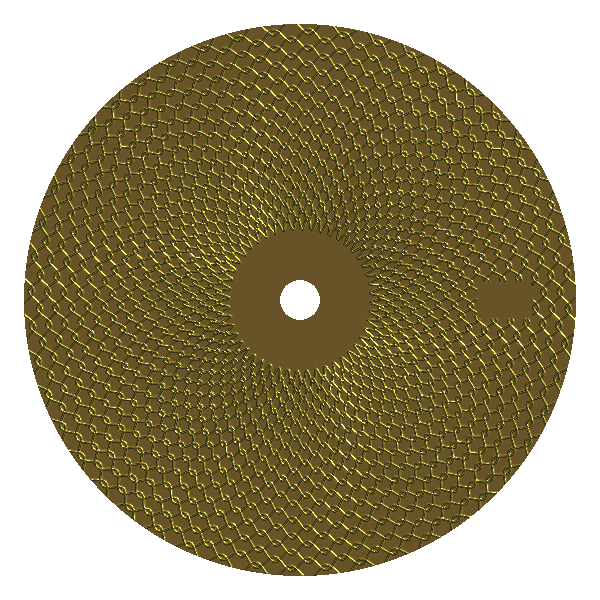
Engraved gold barleycorn (grain d’orge) guilloché watch dial.
Barleycorn field rendered in Dial Studio — the same engine you design with.

What is barleycorn (grain d'orge)?

Barleycorn is a straight-line guilloché pattern in which alternating rows of fine engraved lines are shifted out of phase with one another. Where the rows meet, the offset creates the characteristic pointed, grain-like cells that give the pattern its name. Traditionally it was cut on a straight-line engine (a form of rose engine), and it has been used on watch dials for well over a century because it catches light from many angles while staying visually calm.

It is a workhorse dress-watch field: understated at a glance, but full of depth when light rakes across it. It pairs well with a polished chapter ring, applied markers or printed minute track, and it works in both warm gold and cooler steel or titanium tones.

How to design a barleycorn dial in Dial Studio

  1. Start from the barleycorn starter. Open the barleycorn starter to load a ready-made grain d'orge field on a movement-aware dial.
  2. Set the movement and diameter. Choose a movement profile (or a custom dial) so the field is planned around the real centre hole, date window and marker spacing.
  3. Tune the look fastest with line density, amplitude and ring step. Denser lines read finer and dressier; more amplitude deepens the grain; ring step controls how tightly the rows stack.
  4. Add furniture. Layer markers, numerals, a minute track, text or a logo — Dial Studio masks the guilloché cleanly around each element.
  5. Preview the metal. Switch to the Realistic finish to see engraved relief with real light and shadow before committing to a handoff.
  6. Export the handoff. Generate SVG, DXF, STEP, STL or PNG for your own laser, CNC, water jet, rose engine or vendor conversation.

Related patterns

Before you cut: Dial Studio produces design and export files only. Every maker or vendor should measure, test, verify and adjust — units, kerf, tool paths, registration and aperture fit — before engraving metal.

Free · offline · no account

Design your barleycorn dial.